
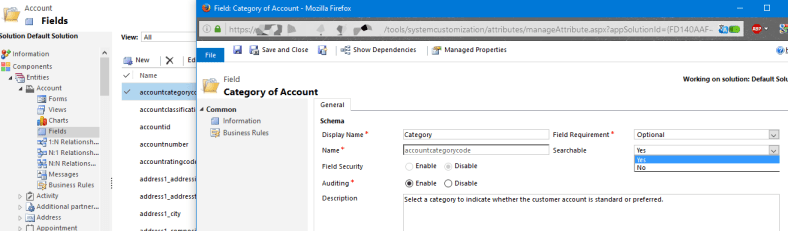
How To Change The Fields That CRM Searches

We’ve all been in the situation where you search for something,  you know it’s there and you probably know how to find it with a workaround of some sort but this really shouldn’t be required.

I had this very situation recently whereby for some reason CRM had decided it wasn’t going to search Full Names of contacts which as you can imagine had caused some headaches for users.

So today I’m going to go through the steps required to change what fields CRM uses to search for specific records, it’s a quick and easy change which can make the user experience a hundred times more efficient.

Continue reading “How To Change The Fields That CRM Searches”

Checking for Broken Links in SharePoint 2013

I have recently released a new article on removing broken links focused on enterprise users, although for small scale SharePoint deployments this tool may be enough for anything larger than a few users I would suggest reading up on QIpoints excellent Broken Link Manager.

It’s a worthwhile investment to spend some time every once in a while making sure that within SharePoint, links that users may have added are not becoming broken as broken links can cause issues such as users no longer being able to find important information, navigation breaking down and images not appearing as they should. Not to mention the strong affect it has on user experience. In isolation these things may not cause too big of an issue but together they could spell doom for your SharePoint deployment.

The Search Engine Optimization Toolkit is a Microsoft product which can be downloaded here for free which allows you to check links for any website, but it also works very well within SharePoint.

Continue reading “Checking for Broken Links in SharePoint 2013”

How to View Marketing Communications in CRM

It’s often required that you can see marketing communications sent to marketing lists in CRM, when an email or any other type of activity is created through a marketing list then that activity is recorded in both the marketing list itself and every individual record within that marketing list. Continue reading “How to View Marketing Communications in CRM”

Quick Guide to Sending Mail Through CRM 2013

This post should act as a ‘quick guide’ to sending mail through CRM using the Quick Campaign feature, this isn’t meant to be a detailed walkthrough, its use is to make sure that users can quickly remember the steps required to send out a mass mailer through CRM alone. Continue reading “Quick Guide to Sending Mail Through CRM 2013”