
I’m currently studying for my latest CRM exam and noticed an interesting issue with the default “Local Facilities/Equipment” view found when trying to assign resources for a service, it doesn’t necessarily show just local equipment!
Author Shaun Wilkinson

Service Management in CRM 2016 – MB2-714 Exam Notes
This post is part of my MB2-714 exam series of articles and contains my notes relating to entitlement management in CRM 2016.
This post covers the following required areas –
- Understand service scheduling scenarios
- Understand the service scheduling process flow
- Define and manage resources
- Implement customer service schedules
- Create and manage resource groups
- Define sites, holiday schedules and services
- Schedule service activities in the service calendar
- Manage service activities
Continue reading “Service Management in CRM 2016 – MB2-714 Exam Notes”

Fixing Broken Links in SharePoint – QIPoint Broken Link Manager Review & Guide
I recently had the fortune of QIPoints founder coming across my blog and commenting that his company offered a piece of software called the “SharePoint Essential Toolkit Broken Link Manager” which is an enterprise equivalent to Microsoft’s own free tool “Search Engine Optimization Toolkit” which I’ve covered before.
Although the plan originally was to review the trial version which as far as I could tell came with a few limitations based on the quantity of documents and sites searched, I was very kindly offered an enterprise copy to give an accurate review of the software’s features and with their new 2016 edition out I couldn’t pass up the chance.
This post will be both a quick review of the newest version for those of you looking for that and also a basic guide to using the software for those of you who have already purchased this product if there is anything I don’t cover in this post that you would be interested to see don’t hesitate to comment below.
Continue reading “Fixing Broken Links in SharePoint – QIPoint Broken Link Manager Review & Guide”
Entitlement Management in CRM2016 – MB2-714 Notes
This post is part of my MB2-714 exam series of articles and contains my notes relating to entitlement management in CRM 2016.
This post covers the following required areas –
- Create and maintain entitlement templates
- create a new entitlement
- add entitlement lines
- associate products
- associate entitlement channels
- associate an SLA
- activate an entitlement
- renew an entitlement
Continue reading “Entitlement Management in CRM2016 – MB2-714 Notes”
Queue Management in CRM – MB2-714 Notes
This post is part of my MB2-714 exam series of articles and contains my notes relating to queue management in CRM 2016 which is an important element of the MB2-714 exam for CRM and which can be one of the more difficult elements to grasp in it’s entirety.
This post covers the following required areas –
- Understand system queues and personal queues
- Create and maintain queues
- Add cases and activities to queues
- Work with queue items
- Implement case routing
Knowledge Base Article Management in CRM – MB2-714 Notes
This post is part of my MB2-714 exam series of articles and contains my notes relating to knowledge base article management in CRM 2016 which is an important element of the MB2-714 exam for CRM.
This post covers the following required areas –
- Search for articles
- Associate an article with a case
- Use knowledge base articles to help resolve cases
- Create, manage and maintain knowledge base article templates
- Create, modify and publish knowledge base articles
- Format articles
- Attach knowledge base articles to email messages
Continue reading “Knowledge Base Article Management in CRM – MB2-714 Notes”
Case Management in CRM – MB2-714 Notes
I’m currently working towards my second Microsoft CRM exam and thought it would be a good practice to record my notes as I go along. Hopefully these prove valuable to others hoping to take MB2-714 CRM Customer Service exam.
This post is part of my MB2-714 exam series of articles and contains my notes relating to case management in CRM 2016 which is an important element of the MB2-714 exam for CRM.
This post covers the following required areas –
- Work with the case list and views
- Search for case records
- Create a new case record
- Understand fields on a default case form
- Analyze business process flows
- Convert activities to cases
- Understand the case resolution process
- Use case routing rules
- Use case creation rules
Useful CRM 2013 Tools
As a CRM administrator I’m all for saving as much time as possible, and as such over the years I’ve collected a small assortment of tools that I use on a daily basis that make working with CRM that much quicker and easier. Below I have included a list of my favourite programs and CRM solutions to tackle every day challenges.

How to Stop CRM Adding the GUID to SharePoint Folder Names (Documents)
CRM has a very useful feature called Documents which allows you to link a CRM and SharePoint deployment in order to store customers documents in SharePoint however with the update to 2013 Microsoft decided that all folders will include not just the records name but that records GUID.
I had a request recently to stop CRM adding the GUID of account records to newly created SharePoint folders and it was surprisingly difficult to find any useful advice. Below I will cover the basic steps required to disable this ‘feature’.
Continue reading “How to Stop CRM Adding the GUID to SharePoint Folder Names (Documents)”
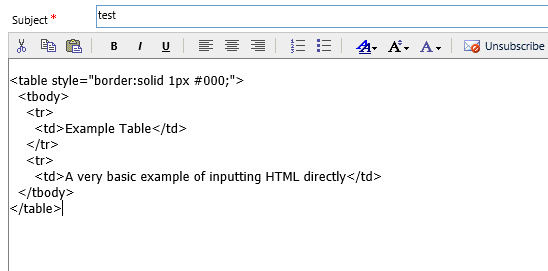
Creating a HTML Email in CRM 2016
Unfortunately CRM 2016 has not seen the long-wished for update to it’s email editor, however not only is it still possible to use the method I covered in my last article on this topic it is also possible to use your favourite text editor to write the HTML and then simply pasting the code into the template editor directly. Continue reading “Creating a HTML Email in CRM 2016”
 SharePoint & CRM